StudioNotes
StudioNotes
  • Home
  • How StudioNotes Works
  • FAQ
  • About
  • Songs vs Recordings
  • Editing Lyrics
  • Links and Identifiers
  • StudioNotes 2.0
  • Attaching Files
  • Audio Player
  • Keywords & Genre Filters
  • Blog
  • More
    • Home
    • How StudioNotes Works
    • FAQ
    • About
    • Songs vs Recordings
    • Editing Lyrics
    • Links and Identifiers
    • StudioNotes 2.0
    • Attaching Files
    • Audio Player
    • Keywords & Genre Filters
    • Blog
Download on the App Store
  • Home
  • How StudioNotes Works
  • FAQ
  • About
  • Songs vs Recordings
  • Editing Lyrics
  • Links and Identifiers
  • StudioNotes 2.0
  • Attaching Files
  • Audio Player
  • Keywords & Genre Filters
  • Blog
Download on the App Store

Keep the Important Files with the Work

StudioNotes 2.0 lets you attach audio files, agreements, artwork, and documents directly to your songs, recordings, releases and contacts.


No more searching across folders, drives, and email threads.

Everything stays connected to the project it belongs to.
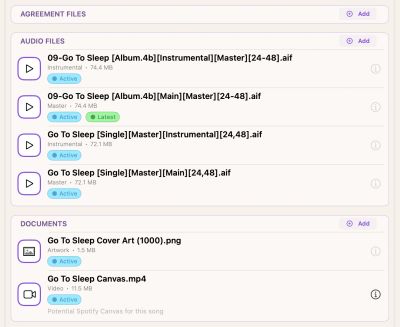
Music Projects Create More Than Songs

Every song, recording and release generates context:

  • Mixes and masters
  • Alternate versions and stems
  • Signed split sheets
  • Performer agreements
  • Artwork drafts
  • Sheet music
  • Reference files


StudioNotes keeps those materials where they belong — alongside the work itself.
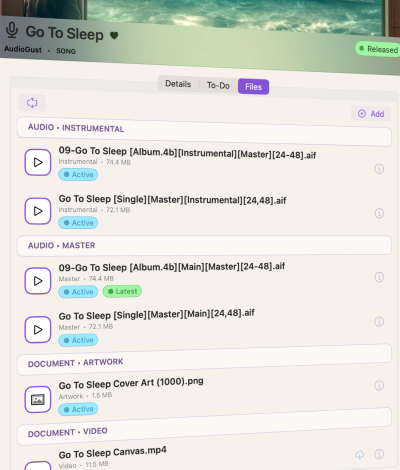
THREE FILE TYPES, CLEARLY ORGANIZED

Organized by Purpose

Files are grouped into three practical categories:

Audio Files

Stems, mixes, masters, rough ideas, alternate versions.

Agreements

Signed split sheets, performer agreements, and other documentation that protects your work.

Documents

Artwork, PDFs, images, sheet music, streaming reports, and supporting materials.


This structure keeps your catalog clean and easy to navigate — even years later.

SMART STORAGE, WITHOUT CLUTTER

Designed for Real Devices

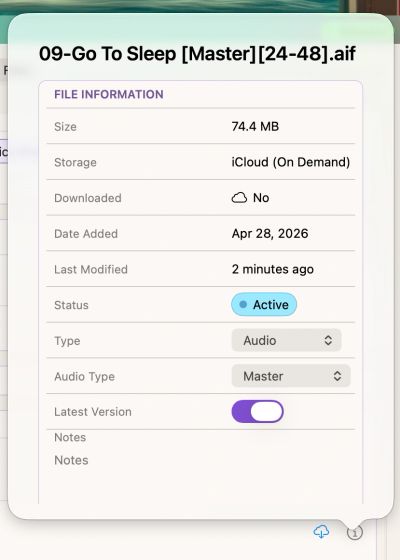
StudioNotes uses your iCloud storage to manage larger files efficiently.

  • Large files stay in iCloud and download only when needed
  • Smaller files can remain available locally
  • You can move files between local and cloud storage anytime


Your catalog stays complete — without permanently filling up your device.


StudioNotes does not host or share your files.
They remain part of your private Apple ecosystem.
BUILT FOR LONG-TERM ORGANIZATION

Keep Your Catalog Future-Proof

• Agreements stay with the release they protect

• Mixes stay with the recording they represent 

• Artwork stays with the single or album it belongs to.

• Contracts stay with the contact they're with


Years from now, you won’t have to guess where things live.


You’ll know.

ADVANCED CONTROL

Flexible Storage Settings

For larger catalogs, StudioNotes includes advanced options — such as automatically moving older files to iCloud storage after a set period.


You stay in control of how your files are managed, without disrupting your workflow.

Bring the Whole Project Together

StudioNotes is free to start and includes full file support from day one.


When your catalog grows, StudioNotes Pro unlocks unlimited projects for long-term professional work.

Copyright © 2026 StudioNotes - All Rights Reserved.

  • Privacy
  • FAQ
  • About
  • Contact Us
  • Blog

This website uses cookies.

We use cookies to analyze website traffic and optimize your website experience. By accepting our use of cookies, your data will be aggregated with all other user data.

Accept