StudioNotes
StudioNotes
  • Home
  • How StudioNotes Works
  • FAQ
  • About
  • Songs vs Recordings
  • Editing Lyrics
  • Links and Identifiers
  • StudioNotes 2.0
  • Attaching Files
  • Audio Player
  • Keywords & Genre Filters
  • Blog
  • More
    • Home
    • How StudioNotes Works
    • FAQ
    • About
    • Songs vs Recordings
    • Editing Lyrics
    • Links and Identifiers
    • StudioNotes 2.0
    • Attaching Files
    • Audio Player
    • Keywords & Genre Filters
    • Blog
Download on the App Store
  • Home
  • How StudioNotes Works
  • FAQ
  • About
  • Songs vs Recordings
  • Editing Lyrics
  • Links and Identifiers
  • StudioNotes 2.0
  • Attaching Files
  • Audio Player
  • Keywords & Genre Filters
  • Blog
Download on the App Store

Find the Right Song — Fast

As your catalog grows, remembering what you wrote becomes harder than writing it.


StudioNotes 2.0 introduces powerful genre and keyword filtering to help you instantly surface the right material — whether you’re responding to a brief or revisiting your own ideas.
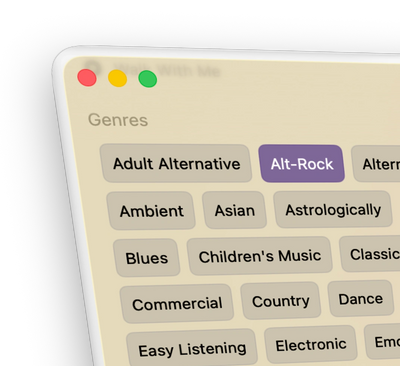
Think in Musical Terms, not Database Logic

Tap to Include. Tap Again to Exclude.

In the sidebar, all your configured genres and keywords appear as selectable tags.

  • Tap once to include a term
  • Tap again to exclude it
  • Combine multiple genres and keywords freely


No query language.
No technical setup.
Just musical thinking.


Want Alt-Rock and Indie?
Tap both.


Want Alt-Rock but not Acoustic Guitar?

Tap Acoustic Guitar again to exclude it.


It’s that simple.
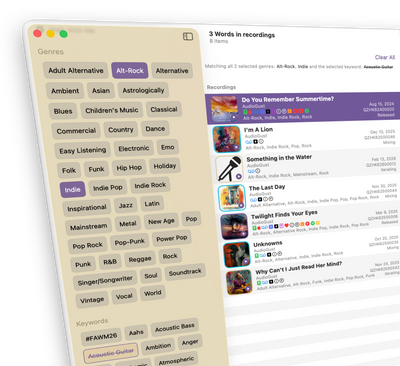
Include or Exclude, Your Way

Match All or Match Any

Choose how your filters behave:

  • All → Show items matching every selected term (AND search)
  • Any → Show items matching at least one selected term (OR search)

You can:

  • Look for songs that are both Alt-Rock and Indie
  • Or search for songs that are either Alt-Rock or Indie
  • Or find anything Pop that does not include Acoustic Guitar


StudioNotes translates your selections into clear, readable logic — without forcing you to think like a database engineer.
Simple, Integrated Workflow

Clear, Human-Readable Search Descriptions

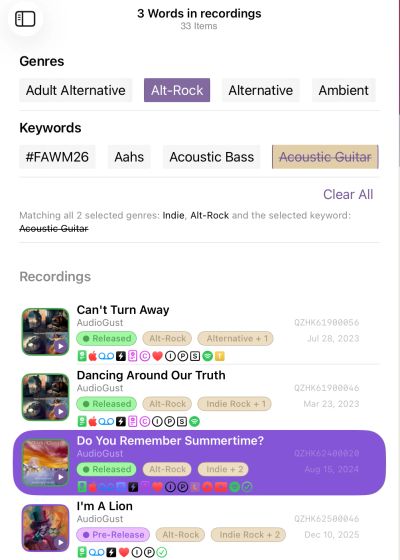
StudioNotes displays a plain-language summary of your active filters.

For example:


“Matching all selected genres: Alt-Rock, Indie
and the selected keyword: ~Acoustic Guitar~”


You always know exactly what you’re looking at.

Perfect for Creative Briefs

Imagine a music supervisor asks for:


Upbeat pop songs about connection — no acoustic guitar.

In seconds, you can:

  • Select Pop
  • Include keywords like Upbeat and Connection
  • Exclude Acoustic Guitar


Instant clarity on whether you have something that fits.


As your catalog grows, this becomes indispensable.

Works Beautifully on Every Device

On Mac and iPad, filters live in the sidebar for quick access.


On iPhone, you can swipe across available genres and keywords at the top of the list view to refine results instantly.


The experience adapts to your device without losing power.

Easy to Build a Rich Catalog

Adding Keywords and Genres Is Simple

When editing a song or recording, you can:

  • Select multiple genres and keywords from a picker
  • Search within the picker when your list grows
  • Type new terms as needed
  • Manage the full list in Settings


The more descriptive your catalog becomes, the more powerful filtering becomes.


StudioNotes encourages better organization — and rewards it.

Getting Long Term Value from your Music

Your Catalog Becomes Searchable, Not Just Stored

Folders and collections are static.


Keywords and Genres are dynamic.


Over time, your catalog transforms into something you can query from multiple angles — by mood, instrumentation, theme, genre, or creative intent.


You won’t just remember what you wrote.


You’ll be able to find it.

Make Your Catalog Work for You

StudioNotes is free to start and includes full filtering support from day one.


When your catalog grows, StudioNotes Pro unlocks unlimited projects for serious, long-term work.

Copyright © 2026 StudioNotes - All Rights Reserved.

  • Privacy
  • FAQ
  • About
  • Contact Us
  • Blog

This website uses cookies.

We use cookies to analyze website traffic and optimize your website experience. By accepting our use of cookies, your data will be aggregated with all other user data.

Accept