StudioNotes
StudioNotes
  • Home
  • How StudioNotes Works
  • FAQ
  • About
  • Songs vs Recordings
  • Editing Lyrics
  • Links and Identifiers
  • StudioNotes 2.0
  • Attaching Files
  • Audio Player
  • Keywords & Genre Filters
  • Blog
  • More
    • Home
    • How StudioNotes Works
    • FAQ
    • About
    • Songs vs Recordings
    • Editing Lyrics
    • Links and Identifiers
    • StudioNotes 2.0
    • Attaching Files
    • Audio Player
    • Keywords & Genre Filters
    • Blog
Download on the App Store
  • Home
  • How StudioNotes Works
  • FAQ
  • About
  • Songs vs Recordings
  • Editing Lyrics
  • Links and Identifiers
  • StudioNotes 2.0
  • Attaching Files
  • Audio Player
  • Keywords & Genre Filters
  • Blog
Download on the App Store

Review Your Work Without Opening Your DAW

StudioNotes 2.0 includes a built-in audio player designed for focused listening and creative iteration.


Play stored mixes, masters, and ideas directly inside your project — right where the lyrics, notes, and details live.
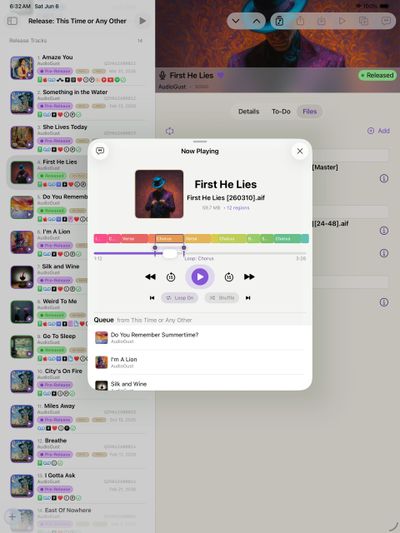
Play from the File — or the Project Itself

Every stored audio file includes a play button in its detail view.
Tap it, and playback begins immediately.


You can also mark one audio file as the Latest for a song, recording, or release.

When you do:

  • A play overlay appears on the main project icon
  • Tapping the project icon starts playback instantly
  • You can review the newest version without opening the Files view


It becomes effortless to hear the current mix of any project.
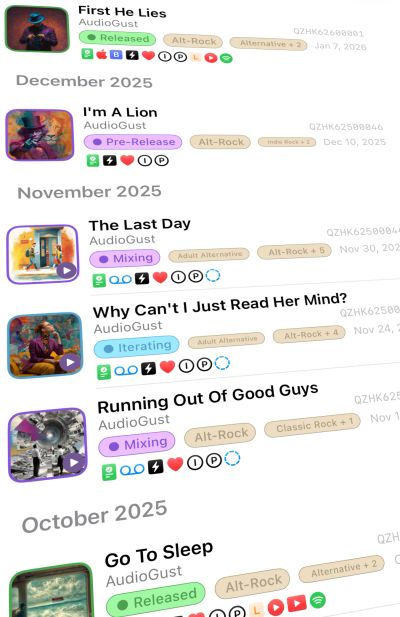
A Player That Stays With You

Mini Player, Always Available

When playback begins, a mini player appears at the bottom of the screen.

  • See the project name and file name
  • Play, pause, and navigate
  • Continue browsing anywhere in StudioNotes while audio plays


The music stays with you as you review notes, check splits, or refine lyrics.


Tap the mini player to expand into the full player view.

Full Player Controls

Focus on the Section That Isn’t Quite Right

Sometimes you’re working on a single line —
a lyric that doesn’t land,
a melody that almost works,
a transition that needs just a little more clarity.


In a DAW, it’s easy to loop a section while you experiment.
In most standard music players, it’s nearly impossible.


StudioNotes brings that focused looping ability into your everyday workflow.


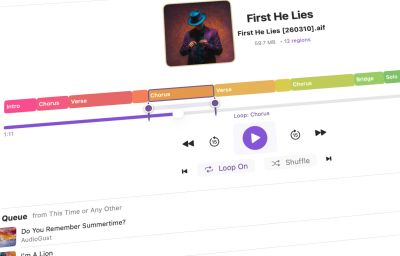
In the full player view, you can:

  • Loop a specific region continuously while you refine lyrics or melody
  • Skip a section to hear how the song flows without it
  • Jump to embedded DAW markers
  • Navigate clearly labeled song sections


Now you can keep a chorus playing while you search for the right line — whether you’re at your desk, on the couch, or away from your studio.


The full player is built for evaluation, not editing.

It helps you think through creative decisions without altering your files.
Simple, Integrated Workflow

Jump Straight to Lyrics

From the player, you can move directly into the lyrics view.


Listen while reviewing chords and phrasing, all within the same workflow.


No switching apps.
No losing context.

Integrated with Apple Playback Controls

StudioNotes integrates with system-level audio controls.


You can:

  • Play and pause from the Lock Screen
  • Skip ahead or back using device controls
  • Use playback controls in CarPlay
  • Control audio from anywhere the OS provides media controls


Your projects behave like real media — because they are.

Audio Stays Connected to the Project

Attach mixes, masters, ideas, stems or demos to a recording — then play them directly from that context.


Years later, you’ll still know:

  • Which version was final
  • Which mix was approved
  • Which draft evolved into the release


Your catalog becomes a living record of creative decisions.

Keep Your Creative Process Together

StudioNotes is free to start and includes full audio playback support from day one.


When your catalog grows, StudioNotes Pro unlocks unlimited projects for serious, long-term work.

Copyright © 2026 StudioNotes - All Rights Reserved.

  • Privacy
  • FAQ
  • About
  • Contact Us
  • Blog

This website uses cookies.

We use cookies to analyze website traffic and optimize your website experience. By accepting our use of cookies, your data will be aggregated with all other user data.

Accept