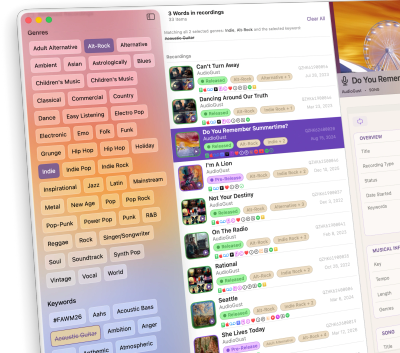
Introducing StudioNotes 2.2
The complete working record of your music.
As your catalog grows, finding information quickly becomes increasingly important. StudioNotes 2.2 updates the interface to improve readability, reduce visual clutter, and make key details easier to find.
Now, you can keep the files, review the work, and find the right material — all in one professional system built for the long run.
What's New
More Than Metadata
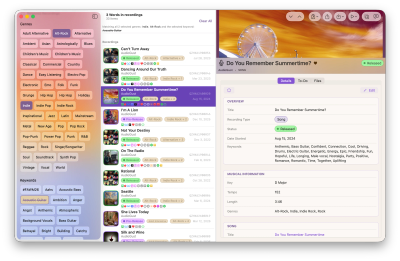
StudioNotes has always helped you track songs, recordings, releases, collaborators, splits, and rights. StudioNotes 2.2 introduces a cleaner, more polished interface across iPhone, iPad, and Mac, making large catalogs easier to browse and important information easier to spot at a glance.
With version 2.2, your catalog becomes more complete.
Now you can:
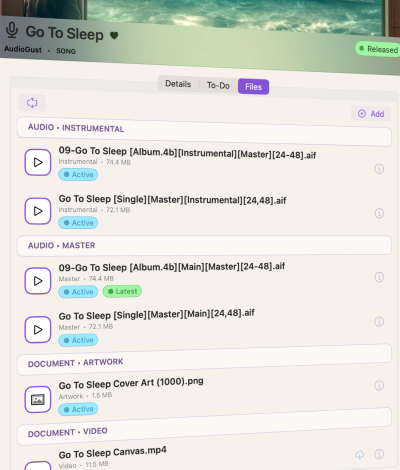
- Attach important files directly to songs, recordings, and releases
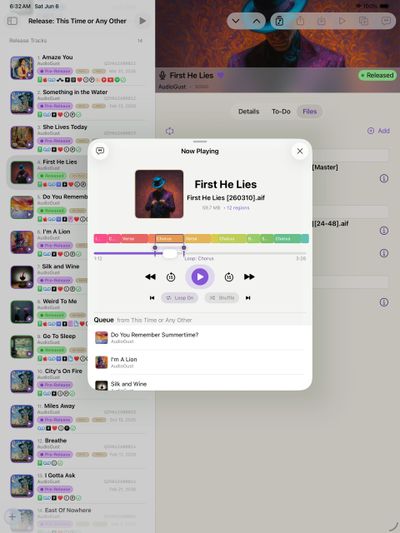
- Review stored mixes and ideas with a built-in audio player
- Create playback queues from your releases and collections (New in StudioNotes 2.1)
- Filter your catalog using powerful genre and keyword combinations
- Backup and restore your entire catalog (New in StudioNotes 2.1)
StudioNotes now holds not just the details — but the context around the work itself.
Files and Documents
Keep the Important Files with the Work
Attach:
- Mixes, masters, stems, and demos
- Signed split sheets and performer agreements
- Artwork, sheet music, reference documents, and more
Large files stay in your iCloud storage and download only when needed, so your devices don’t fill up.
Your artwork and agreements are connected to the release they belong to. Your mixes are connected to the recording they represent. Your catalog stays complete.
Integrated Audio Player
Review Your Work Without Opening Your DAW
Listen to stored audio files directly inside StudioNotes.
- Loop specific sections to focus on a chorus or verse
- Skip sections to evaluate alternate structures
- Jump to markers exported from your DAW
- Play entire collections or releases in order with customizable playback queues
Whether you're refining a lyric, reviewing a mix, or preparing a release, your audio is available exactly where you need it.

Genre and Keyword Filtering
Find the Right Song Recording or Release, Fast
As your catalog grows, finding the right material matters.
StudioNotes 2.0 introduced advanced filtering by genres and keywords.
- Combine multiple genres
- Include or exclude specific keywords
- Search for exactly what a brief requires
Looking for “alternative” or "indie" songs that don't have acoustic guitar but do include electric guitar? Now you can find them instantly.
Your catalog becomes searchable in ways folders never could be.